


MOTORMIA: Tune & Mod Your Ride
4.6182.00 Reviews
App Specs
- Version
- 3.6.3
- Updated On
- License
- Free
- Downloads
- 50,000+
- Developer
- MOTORMIA
- Categories
- Auto & Vehicles
- Platform
- Android
Screenshots
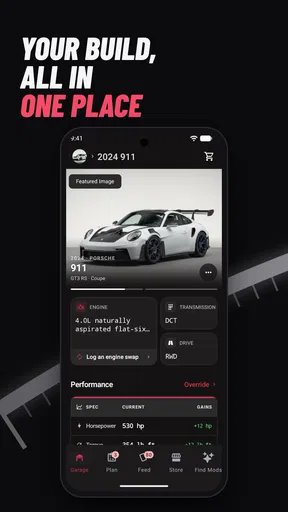
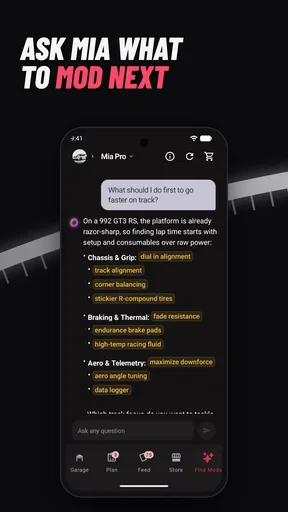
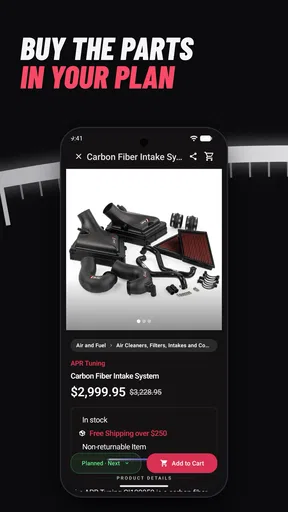
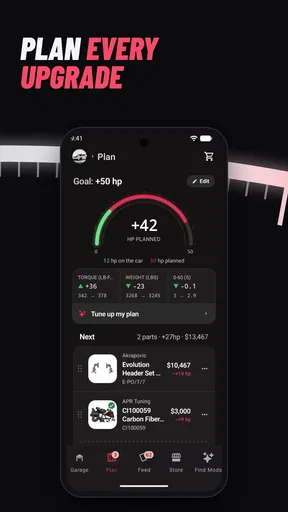
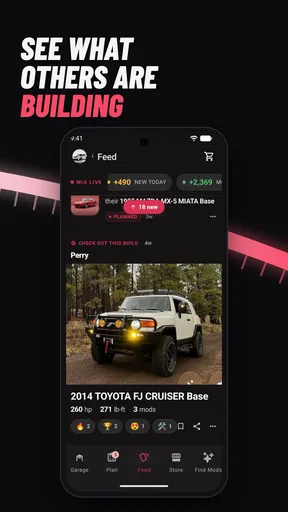
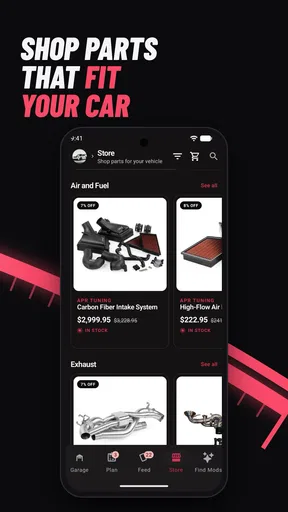
 Analysis by AppCompare
When I use MOTORMIA: Tune & Mod Your Ride, the first thing I notice is how much the experience depends on visual information: cars, parts, and the way one change appears beside another. That makes it inviting for anyone who enjoys browsing vehicle modifications, but it also means the app is easiest to approach when you can comfortably read and compare what is on screen. I would treat it as a place to explore ideas and personalize a virtual ride, rather than as a substitute for practical advice about modifying a real car.
Reading the choices without rushing
The app is an Auto & Vehicles app from MOTORMIA, and its central appeal is the link between choosing modifications and imagining how they might shape a car. If you are new to this kind of customization, I’d take the opening session slowly: look at one group of options at a time and note what you changed before moving on. That simple habit makes it easier to tell whether you prefer a visual adjustment, a performance-focused one, or a combination.
For a casual user, the useful question is not just “Does this look good?” but “What am I trying to change?” A person browsing for styling ideas can focus on appearance, while someone curious about tuning can compare the choices they are considering and keep a mental record of the trade-offs. I found that setting a small goal before opening the app—such as exploring a cleaner look or a more performance-oriented setup—helps keep the experience focused instead of turning every session into aimless tapping.
That approach also helps if dense screens or lots of choices are tiring. I would avoid trying to judge every option in one sitting. Pause between decisions, return to the car view, and compare the result with your starting point. Short, deliberate sessions are a more comfortable way to explore than trying to make a complete build all at once.
A visual hobby, with practical limits
Car customization is naturally visual, so the app’s strongest appeal is likely to people who enjoy looking closely at how a vehicle’s style changes. If color, shape, and the overall impression of a build matter to you, there is plenty to think about. If you have difficulty distinguishing small visual differences, or simply prefer experiences that explain choices mainly through text or audio, this may take more effort than a straightforward reference guide.
I would also separate a satisfying virtual experiment from a real-world mechanical recommendation. Exploring an engine or handling adjustment can make the idea of tuning more approachable, but a digital result should not be treated as proof that a real modification will be safe, legal, compatible, or suitable for your vehicle. For an actual purchase or installation, confirm fitment and safety with reliable vehicle-specific information and a qualified professional.
That distinction matters especially for newcomers. A virtual build can help you organize your tastes before talking to a mechanic or parts seller, but it cannot replace checking your car’s exact model, condition, and requirements. I see the app as a useful starting point for curiosity—not the final word on a real-world upgrade.
Worth Reading Before You Choose

EA SPORTS FC Mobile 26 Is a Bigger Football Game, but It Takes Time

Flipboard Shows What News Apps Must Do Beyond the Feed

Switching to Android Auto Means Rethinking Your Driving Routine

Google Calendar Makes a Crowded Week Easier to Manage

Ludo King Makes the Most of the Minutes Between Plans

Baby Panda World Brings Quick Play to Modern Phones, but Its Game Library Feels Busy
Fitting it into everyday life
A realistic use for me would be opening the app while waiting for an appointment, choosing one style direction, and saving the main idea mentally or in a note before closing it. Later, I could revisit that idea when comparing real parts or discussing a project with someone who knows my vehicle. This keeps casual inspiration separate from decisions that involve money, installation, or safety.
It may also work well as a shared conversation starter. If a friend is into cars, you can compare what each of you would prioritize—appearance, performance, or a balanced look—without needing to agree on one “correct” build. On the other hand, if your goal is to diagnose a fault, find a precise replacement part, or get step-by-step repair instructions, a dedicated vehicle manual or parts resource is the better tool.
Compared with browsing general car videos or image galleries, a customization app gives you a more hands-on way to think through a build. The trade-off is that inspiration is not the same as verified technical guidance. I would use MOTORMIA to narrow down what I like, then use a specialist source to check whether a real component suits my car and circumstances.
Who will find it comfortable—and who may not
The app is free, rated for Everyone, and has an average rating of 4.3 from around 683 ratings, with 50K+ installs. It was released on November 1, 2024, and version 3.2.0 requires Android 7.0 or later. Those details make it easy to place the app, but they do not tell me whether every screen will suit every person; comfort depends on how you interact with visual choices and how much detail you want to process at once.
I’d recommend giving it a try if you enjoy car styling, want a low-pressure way to explore tuning ideas, or like comparing different approaches before committing to a real project. I’d be more cautious if you need precise technical specifications, rely on nonvisual navigation, or find option-heavy interfaces exhausting. In those cases, a text-led guide, a vehicle-specific manual, or advice from a qualified mechanic may be more useful.
Where friction can still show up
Even when an app is free to install, time and attention are still costs. A user who is unsure what a modification means may find that browsing creates more questions than answers. My tip is to keep a short list of terms or parts you want to investigate, then check them through a trusted technical source rather than guessing from appearance alone. That turns the app into a prompt for learning instead of a source of assumptions.
Context matters, too. I would not use a phone while driving, even if a car-related idea comes to mind; wait until you are parked somewhere safe. If you are using the app with someone who has different visual or motor needs, let them set the pace and offer verbal descriptions rather than taking over the device. Those small choices make a shared session more comfortable without pretending the app itself provides a particular accessibility feature.
Getting Started with Your Ride
The moment I opened MOTORMIA: Tune & Mod Your Ride, I was greeted with a slick interface that screams "gearhead paradise." The app does a great job of easing you into the action with a quick tutorial that covers the basics of modifying and tuning your virtual car. Even if you're new to car games, MOTORMIA makes it simple to get started without feeling overwhelmed.
The selection of cars is impressive, offering everything from classic muscle cars to sleek, modern speedsters. Each vehicle has its own unique flair, and the customization options are nothing short of extensive. I found myself lost for hours, tweaking every little detail to create my dream ride.
Customization Galore
One of the standout features of MOTORMIA is the sheer depth of customization. You can modify almost every aspect of your car, from the engine and exhaust to the paint job and decals. It's like having a virtual garage where you can let your creativity run wild. I particularly enjoyed experimenting with different combinations to see how they affected performance and aesthetics.
But it’s not just about looks; performance tuning is key here. The app offers a real sense of progression as you tweak your car's horsepower and handling to perfection. It made me feel like a true mechanic, balancing speed with style.
Racing and Challenges
Once you've got your ride pimped out, it's time to hit the streets. The racing experience in MOTORMIA is exhilarating, providing a variety of tracks and challenges to test your skills. I loved the thrill of competing against other players and climbing the leaderboards.
The controls are intuitive, allowing you to focus more on strategy and customization rather than struggling with gameplay mechanics. Whether you're a seasoned racer or just starting out, the app offers something for everyone.
Community and Social Features
Another element I found captivating is the social aspect of MOTORMIA. You can join clubs, participate in events, and share your creations with a community of fellow car enthusiasts. It adds a layer of engagement that keeps you coming back for more. I found myself checking in regularly to see what cool new mods my friends had come up with.
Visuals and Sound
The visuals in MOTORMIA are top-notch. The attention to detail in both the cars and the environments is remarkable. Whether you're racing through sun-drenched streets or a neon-lit urban landscape, the graphics are immersive and vibrant.
The sound design complements the visuals perfectly. The roar of the engines, the screech of tires, and the pulse-pounding soundtrack all add to the adrenaline-fueled experience. It's clear that a lot of love and care went into crafting the sensory experience.
Final Thoughts
In conclusion, MOTORMIA: Tune & Mod Your Ride is a must-have for anyone who loves cars and customization. It's a playground for creativity and competition, offering endless possibilities for creating the ultimate ride. While it might not replace the thrill of working on a real car, it comes pretty darn close.
If you're eager to download and start tuning, you can find the app available for both Android and iOS. So, what are you waiting for? Get in there and start building your dream machine. Who knows, you might just find yourself the next top racer on the leaderboard!
Pros
- User-friendly interface for easy navigation.
- Extensive customization options available.
- Realistic graphics enhance gameplay experience.
- Regular updates with new features.
- Community challenges foster player interaction.
Cons
- In-app purchases can be pricey.
- Requires internet connection to play.
- Occasional ads may disrupt gameplay.
- Limited support for older devices.
- Performance issues on low-end phones.
FAQs for MOTORMIA: Tune & Mod Your Ride
What features does MOTORMIA offer for car customization?
MOTORMIA provides a comprehensive suite of customization options for tuning and modifying your car. Users can select from a variety of body kits, paint options, rims, and performance upgrades. The app also includes a virtual garage where you can test drive and tweak your car's settings to optimize performance and aesthetics.
Is MOTORMIA suitable for beginners in car tuning?
Absolutely! MOTORMIA is designed to be user-friendly, making it accessible for both beginners and experienced enthusiasts. The app offers detailed tutorials and guides to help newcomers understand the basics of car tuning, ensuring a smooth and enjoyable experience as they learn to modify their vehicles.
Does MOTORMIA require an internet connection to function?
While many features in MOTORMIA can be accessed offline, certain elements like downloading new parts or participating in community events do require an internet connection. It’s recommended to have occasional connectivity to fully experience the dynamic content and updates provided by the app.
Are there in-app purchases in MOTORMIA?
Yes, MOTORMIA includes in-app purchases that allow users to unlock premium parts, exclusive designs, and advanced tuning tools. While the core app is free, these purchases can enhance your experience by providing additional customization options and features that aren't available in the standard version.
What devices are compatible with MOTORMIA?
MOTORMIA is compatible with both Android and iOS devices. It is optimized to run smoothly on a wide range of smartphones and tablets. For the best experience, ensure your device meets the app's minimum system requirements, which typically include a recent OS version and a moderate amount of storage space.


